fit() returns an arviz.InferenceData object and also stores it on
mmm.idata.
What fit() does
When you call fit(X, y), Abacus:
checks that pandas X and y use the same index, if both are pandas
objects
builds the PyMC graph automatically if it has not been built already
merges sampler settings from the model’s sampler_config and your call-time
kwargs
runs pymc.sample(...)
computes deterministic variables and adds them to the posterior group
stores the training data in an InferenceData.fit_data group
writes model metadata into idata.attrs
That means fitted contribution variables such as channel_contribution,
intercept_contribution, and yearly_seasonality_contribution are available
in mmm.posterior after fitting when they are part of the configured model.
Configure the sampler
You can configure PyMC sampling in two places:
Where
Use it for
Precedence
sampler_config= in PanelMMM(...)
Stable defaults you want to reuse across fits
Lower
fit(..., **kwargs)
Run-specific overrides such as draws, chains, or random_seed
Higher
Abacus merges them so that explicit fit() kwargs win.
mmm=PanelMMM(date_column="date",target_column="revenue",channel_columns=["channel_1","channel_2"],adstock=GeometricAdstock(l_max=4),saturation=LogisticSaturation(),sampler_config={"draws":1000,"tune":1000,"chains":4,"target_accept":0.9,"progressbar":False,},)# Overrides draws from sampler_config, keeps target_acceptidata=mmm.fit(X,y,draws=500,random_seed=42)
Common sampler arguments
These are passed through to pymc.sample(...).
Argument
What it controls
draws
Posterior samples kept after tuning
tune
Warm-up or adaptation iterations
chains
Number of MCMC chains
cores
Number of worker processes used by PyMC
target_accept
HMC or NUTS acceptance target
progressbar
Whether PyMC shows a progress bar
random_seed
Sampling reproducibility
If you do not specify progressbar, Abacus defaults it to True unless your
sampler_config already sets it.
When to build first
For a standard workflow, call fit() directly.
Call build_model(X, y) first only when you need to inspect or modify the
graph before sampling. For example:
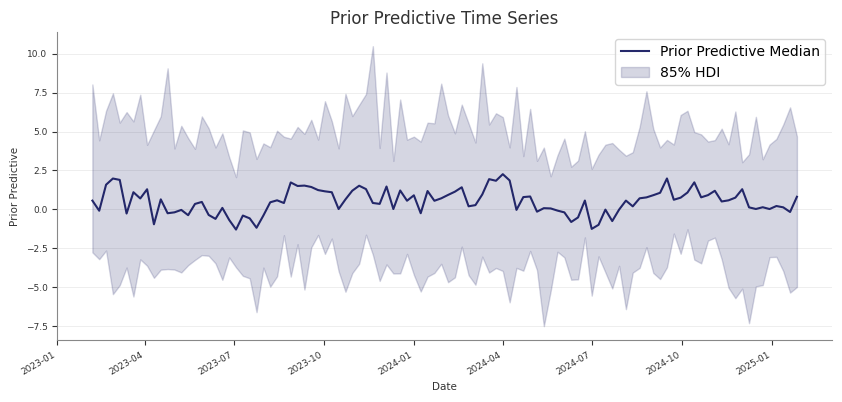
If you run prior predictive checks first and then call fit(), Abacus keeps
the existing prior and prior_predictive groups on mmm.idata.
That makes it practical to compare:
prior assumptions
posterior fit
posterior predictive behaviour
within one saved InferenceData object.
Common pitfalls
Skipping prior predictive checks and only noticing implausible priors after a
long fit
Treating prior predictive checks as a substitute for posterior predictive
assessment
Forgetting that sample_prior_predictive(...) returns extracted predictive
draws, while the full prior and prior_predictive groups are stored on
mmm.idata
Next steps
After the prior predictive behaviour looks reasonable, fit the model with
Fitting the Model.
Save and Load
Use save and load when you want to persist a fitted PanelMMM and rebuild it
later without redefining the whole model configuration in code.
save() writes the model’s InferenceData to NetCDF. load() reads that file,
recreates the PanelMMM configuration from stored metadata, restores
loaded.idata, and rebuilds the PyMC graph from the saved training data.
What Abacus stores
Abacus relies on more than the posterior draws for a full round trip.
Stored item
Why it matters
posterior and other InferenceData groups
Preserve sampled results
fit_data
Rebuild the model graph with the original training data
idata.attrs
Reconstruct PanelMMM init kwargs and validate compatibility
The stored attrs include both the shared model metadata and PanelMMM-specific
configuration such as:
date_column
channel_columns
target_column
target_type
dims
control_columns
control_impacts
adstock and saturation
adstock_first
yearly_seasonality
time_varying_intercept and time_varying_media
scaling
model_config
sampler_config
serialised mu_effects
save() behaviour
save(fname, **kwargs) is a thin wrapper over self.idata.to_netcdf(...).
Important constraints:
the model must already be fitted
self.idata must contain a posterior group
any extra kwargs are passed directly to InferenceData.to_netcdf(...)
If you call save() before fitting, Abacus raises:
RuntimeError: The model hasn't been fit yet, call .fit() first
load() and compatibility checks
By default, PanelMMM.load(...) validates that the saved file matches the
current model class and configuration:
loaded=PanelMMM.load("mmm.nc",check=True)
With check=True, Abacus verifies:
the saved model version
the saved model id derived from the serialised configuration
If those checks fail, Abacus raises DifferentModelError.
If you need to bypass those checks, you can set check=False:
loaded=PanelMMM.load("mmm.nc",check=False)
Use that only when you understand why the saved metadata does not match.
Load from an in-memory InferenceData
If you already have an InferenceData object, use load_from_idata(...)
instead of saving to disk first:
loaded=PanelMMM.load_from_idata(idata,check=True)
This is the same round-trip path that load() uses internally after reading
the NetCDF file.
Where build_from_idata() fits
build_from_idata(idata) is the lower-level rebuild step. It:
restores supported serialised mu_effects
reads idata.fit_data
splits that saved training data back into X and y
rebuilds the PyMC graph
You usually do not need to call build_from_idata() yourself because
load() and load_from_idata() already do it.
Round-trip limitations
Not every fitted object can be restored fully.
EventAdditiveEffect does not round-trip
Abacus does not deserialize EventAdditiveEffect because the original
df_events DataFrame is not stored in the saved attrs. In that case,
PanelMMM.load(...) fails fast while rebuilding the model.
Do not drop fit_data if you want to reload
Because rebuild uses idata.fit_data, do not save a partial file that omits
that group if you want to call PanelMMM.load(...) later.
But it is not a full PanelMMM round-trip artefact, because the saved file no
longer includes the training data needed for build_from_idata(...).
Practical advice
Use the default save() behaviour for round trips.
Keep check=True unless you have a specific compatibility reason not to.
Prefer PanelMMM.load(...) over loading NetCDF manually.
Refit or rebuild event effects explicitly rather than expecting saved event
state to deserialize.
Next steps
After loading a model, you can go straight to posterior predictive sampling,
diagnostics, decomposition, or optimisation using the restored idata and
rebuilt graph.